
OpenClaw Field Notes: A Lawyer Tries to Tame an Autonomous AI Agent

When I entered /new to restart OpenClaw for the third time one morning, I knew I had enough.
I could see what OpenClaw could do for Zeeker, my open source legal data project — automate the GitOps (using Git to manage infrastructure and deployments), handle the tedious DevOps work that's genuinely painful when you're one person. The trial and errors, the constant restarts and model churn were the price of figuring out OpenClaw. 352,000+ GitHub stars and a community that won't stop talking about it. The hype has weight.
But getting from "installed" to "useful" turned out to be a different journey entirely.
These are my field notes from the first few weeks of trying to make OpenClaw work for a real project. Not a review. Not a recommendation. Just an honest account of what happened when a lawyer tried to tame an autonomous AI agent.
Why I'm Using Zeeker as My Test Subject
Let's get this out of the way first: I did not point OpenClaw at client work. The security concerns are well-documented. Cisco found that 26% of 31,000 ClawHub skills contained vulnerabilities. OpenClaw's own maintainer warned it's "far too dangerous" for non-technical users. The Business Times Singapore recently ran a feature on shadow AI risks with NUS, KPMG Singapore, and SGTech all weighing in. That conversation is happening here too, and it's not hypothetical.
So I picked something manageable. Zeeker is my open source project for Singapore legal data. It has real infrastructure needs — container orchestration, CI/CD pipelines (the automated systems that build and deploy code), deployment automation — and I'm the only person maintaining it. If the agent messes something up, the blast radius is me.
 Houfu Ang
What Actually Makes OpenClaw Different
Before we go further, it's worth understanding why OpenClaw isn't just another AI chatbot. Three things set it apart.
It's long-running. Most AI tools wait for you to type something and then respond. OpenClaw has a "heartbeat" scheduler. You can set it to wake up every 30 minutes, check on objectives, and act autonomously. It keeps working while you sleep. That's a fundamentally different relationship with an AI tool.
It has a skills system. Skills are packaged automations the agent can execute. There's a marketplace (ClawHub) where people share them. You can build your own. This is how OpenClaw goes from "general-purpose agent" to "agent that does your specific things." I wrote about why skills changed how I think about prompt engineering — that mental model carries directly into agent work.
You interact through channels. Not a web interface. Not a terminal. You talk to OpenClaw through WhatsApp, Telegram, Slack, or Discord. The idea is that your AI agent lives where you already communicate. In practice, this means you can check on a running task from your phone while you're in court.
These three things — long-running, extensible, channel-based — are what make OpenClaw genuinely interesting. It's not a smarter chatbot. It's an attempt at a digital coworker.
Where Things Got Hard
The initial setup was genuinely smooth — wizards, automatic codebase scanning, a working mental model of Zeeker within minutes. It felt like onboarding a new colleague who actually reads the documentation. That first impression creates a false sense of momentum. Because the real decisions come next.
The mindset shift I had to make: stop thinking in terms of context engineering. With most AI tools, the game is about crafting the right prompt, managing the context window, setting up retrieval. With OpenClaw, the game is designing the harness. What machine am I running on? What model can I afford? What other agents surround it and how do they coordinate? It's a different kind of problem entirely.
Where do you install it? OpenClaw runs locally on your machine by default. But if you want it to be truly long-running — working while you sleep, that heartbeat scheduler doing its thing, talk to it meaningfully on your phone — your machine needs to stay on. You could run it on a cloud VM instead, but that means understanding cloud infrastructure, security groups, remote access, and costs. You could self-host on a home server like Daimon Legal in Australia does, but that's still another layer of knowledge.
caffeinate. Run caffeinate -i in a terminal to prevent your Mac from sleeping while the agent works. Which model do you connect? OpenClaw supports Claude, GPT, Qwen, GLM, Gemini, and local models. Each has different costs, capabilities, and token limits. Running a model locally means understanding hardware requirements and how to host it on your machine. Using a cloud API means understanding pricing tiers and rate limits. I chose an API model and burned through tokens faster than I expected just figuring out what to do.
What do you actually use it for? This was the hardest question. Zeeker has dozens of things that could be automated. GitOps workflows. Infrastructure provisioning. CI/CD pipeline management. Monitoring and alerting. Documentation updates. Every one of these is a legitimate use case. But I wasn't sure which ones OpenClaw could actually handle well, and every failed experiment cost time and tokens.
Here's the uncomfortable truth: these aren't legal tech decisions. They're harness decisions — the kind of setup and plumbing that DevOps engineers handle with years of learning. And if you're a lawyer — even a lawyer who codes — this knowledge gap is real.
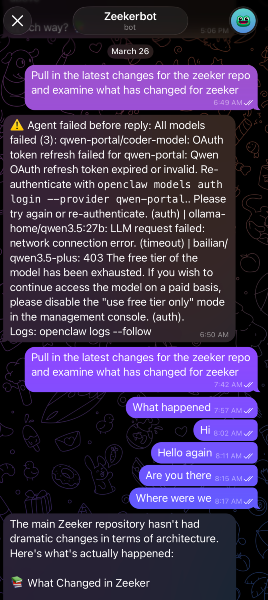
And then there's stability. This is the part that really got to me. OpenClaw shipped 13 releases in March alone. That sounds impressive until you realise what it means in practice: constant breaking changes. Reddit threads are full of people spending hours debugging after updates. A GitHub issue reports the gateway crashing every 50 minutes. One Facebook user put it bluntly: "OpenClaw breaks more easily than glass."
I tried using Claude Code as a routing layer in front of OpenClaw — the idea being that Claude Code would dispatch the right task to the right OpenClaw skill based on what I asked. In theory, a clean separation: Claude as the brain, OpenClaw as the hands. It kept breaking. Not in dramatic ways. In quiet, frustrating ways where things just stopped working and you're not sure why.
I was at a Claude Code meetup last month where everyone was buzzing about what they'd built with OpenClaw. Impressive demos. Advanced workflows. And I kept thinking: how? The computing power alone for what they were showing must have been enormous. My best guess is they were burning through Opus API credits at a rate most of us can't sustain. The demos look magical. The daily reality is different.
A Framework: From What You Have to What You Can Do
After a few frustrating weeks of scattered experiments, I went looking for a framework. Not because I'm naturally a framework person, but because I had free time while installing OpenClaw again.
The one I found most useful works in three steps: