
Word on Claude: The Lawyer's Greatest Legal Tech Tool Strikes Back

Am I about to be very wrong?
At the start of the year, I boldly predicted that in 2026 we would reach a stage where contract reviews can be performed without opening Microsoft Word. "No Word plugins, no hand-writing edits. Just prompting AI to output what I want.” Success was clearly defined: if I had to open Word to make an edit, we are not there yet.
 Houfu Ang
Five predictions grounded in actual practice, testable through the year. Prediction #1: complete routine contract reviews without opening Word.
It is April 2026. Fresh from Legal Skills — the February Cowork plugin that wiped an estimated $285B from legal tech market caps in a single trading session — Anthropic shipped Claude for Word. It prominently featured contract review as its flagship use case. Native sidebar. Tracked changes. Claude ❤️ Word?
Throwing off the yoke of being bound to silly predictions, I decided to install Word and run the Claude plugin once it was available to Pro and Max subscribers. I was curious as to what this means for lawyers and their love-hate relationship with the greatest legal tech tool of all time – Microsoft Word.
The Quick Verdict
So what do I think after trying to use it to edit contracts?
The product is good. Easy install — if you've ever used a Word plugin, this is familiar. The agentic editing capabilities are stronger than any other AI solution I've tried in Word. You can follow its work as it processes your prompt, complete with track changes.
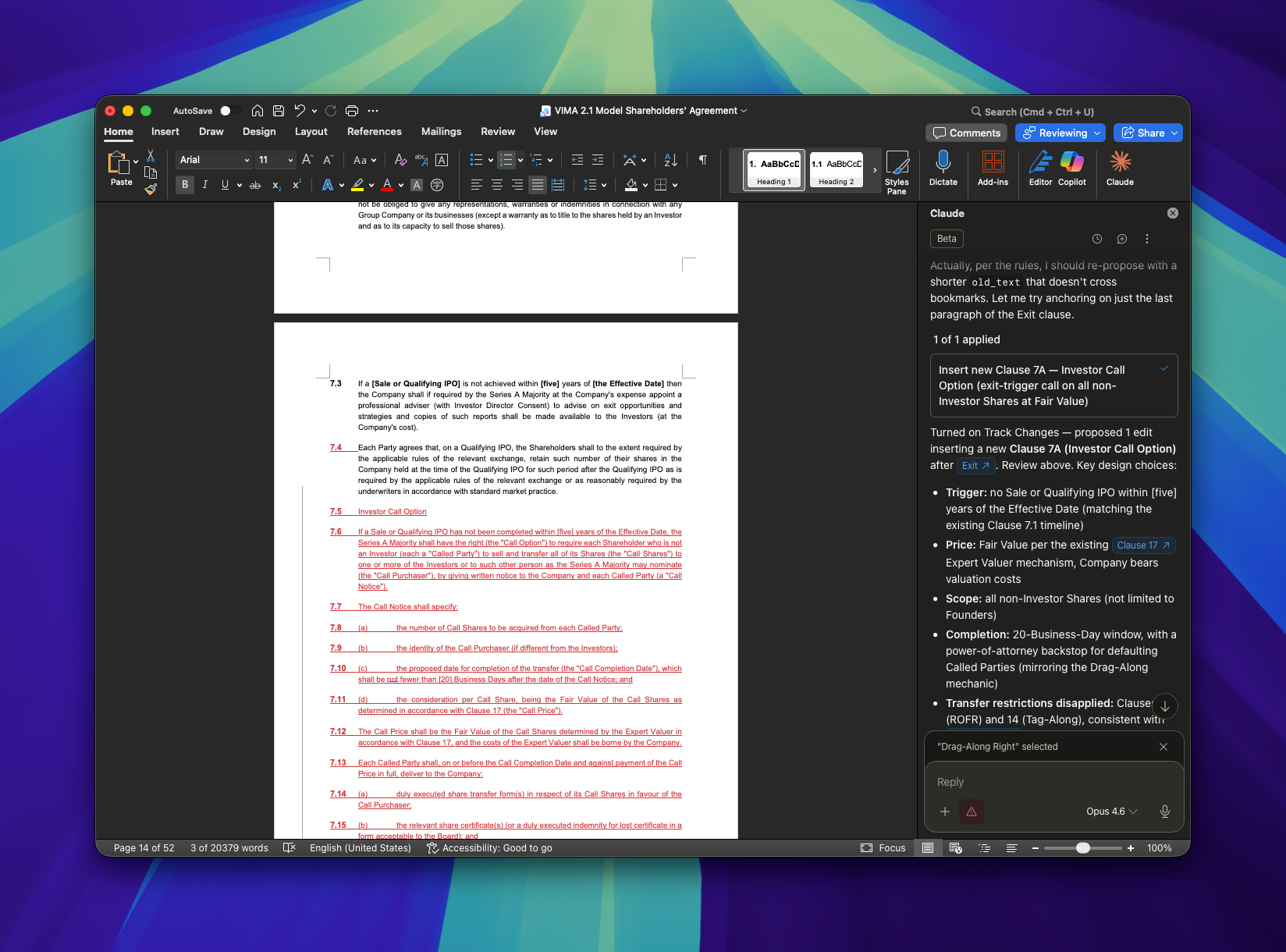
You don't have to take my word for it. Over this past weekend, Ritwik Bhattacharya — a Latham & Watkins innovation attorney based in Singapore —tested it against Stanford's ContractNLI, one of the few public legal benchmarks for contract review. It passed the mechanics. Document Q&A with citations, multi-document comparison via a multi-agent architecture, planted-change detection — all working.
Many users were also impressed with Claude agent's ability to speak to each other. After finding that Copilot refused her task, Veronica was able to get Claude in Word to message Claude in Excel to build a workbook in real time to create a log of exhibits from a Word Memo. Chong Liu was able to synchronise changes from the English version of a contract to a Chinese version of the same in another Word document.
Ultimately, I think your perspective on Claude for Word will be coloured by your familiarity with the technology.
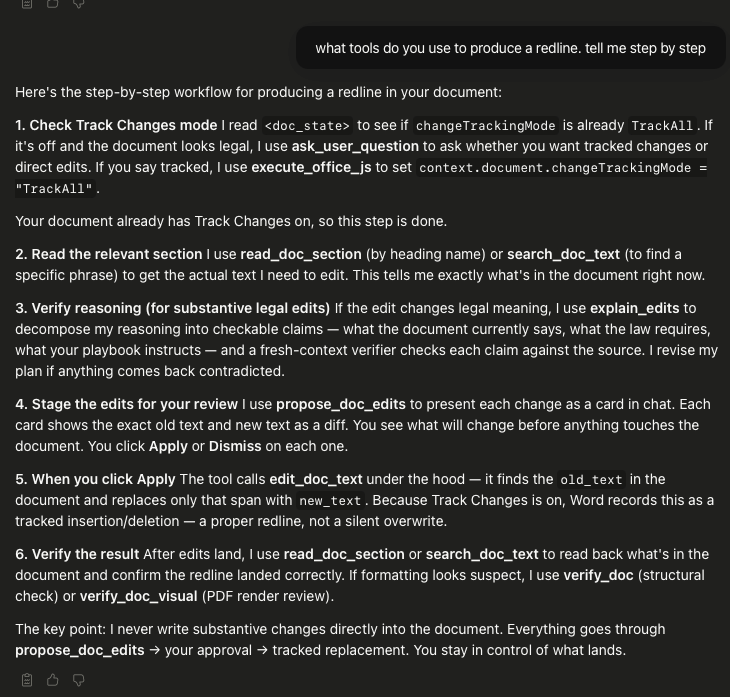
If you are a heavy user of Claude like me, this is a sigh of relief. I’ve long felt frustrated with current LegalTech tools which use agents, and to finally see the power of Opus operating within a Word document is a revelation. This might be because there is a “Claude” way of doing these things. A cursory look at Claude plugin’s audit trail reveals many familiar Claude Code tools — AskUserQuestion, TodoWrite and Bash — as well as new ones that seem to be created just for Word. For anyone who isn't already using Claude Code: that means the Word plugin runs on the same agent tools as Claude’s developer tooling, not a watered-down consumer wrapper. Same orchestration, new surface.
The Clarifying Moment
When thinking about how to write reviews, I like to think from the perspective of the user this product is made for. It’s clarifying for reasons you don’t expect.
And that story begins with me helping my mom with her training Powerpoint slides.
She'd tried Copilot first. Sure, it reads your instructions. But the product was so far away from what she needed, it was useless. She'd tried Meta (the one you find inside WhatsApp). Same thing.
So I introduced her to Claude. Claude was a huge step up. But here's what I noticed as we worked.
When we wanted to rethink the deck's structure — the messages to transmit, what sections to drop, what to add — we did that in the Claude web interface. Chat back and forth, see the whole thing, reshape it.
When we wanted to accept specific edits to specific slides, the PowerPoint plugin was easier. Select the element, tell Claude what to change. See the change. Accept it. Move on.
Same AI. Two interfaces. Two jobs.
I expected the web app to be able to do anything the Word plugin could do, and barring edge cases, I still think that’s true. You can do minute edits in the web interface.
But the interface changes what kind of thinking is comfortable. Big-picture reasoning is hard to hold in a 300-character sidebar.
So the interface chooses the work for you. Pick the wrong one, and you'll unconsciously do the wrong kind of thinking.
The Thesis: Interface Signals the Work
Which brings me to something controversial.
If you're using Word plus the Claude plugin, you're doing junior work. Clause tweaks. Minute edits. Comments to accept or reject. The details matter of course, but this is really a narrow view. You can’t see past the document you’re reviewing.
To think strategically — to think like a lawyer — you need to see the contract as part of a transaction. What do the parties actually want? What position is this document taking?
Those questions don’t live in a sidebar. You can’t see a workflow or a dashboard from a sidebar in a Word document. That can only happen from a place where you can read several documents at the same time, which gives you the freedom to ask what is going on and what needs changing.
So interface matters a lot. If you’re a GC, do you spend your time poring over minutiae or are you doing strategy? The answer might be found in which interface you spend the most time in.
Comparing Claude X Word with other LegalTech
But what if you already use other LegalTech, such as Copilot or Harvey? Does Claude in Word change anything?
Over the weekend, Alexios van der Slikke-Kirillov — a GC at Masdar in Abu Dhabi — published video review answering exactly that. Alexios has used Copilot and Spellbook. His take: Claude for Word is a different species. Unlike the off-the-shelf legal AI products that configure themselves, Claude for Word hands you a kit — skills, playbook structure, multi-agent orchestration — and expects you to assemble it.
For Alexios, that's the whole point:
If, as General Counsel, you want to understand and control what your AI does with your work product, go for Claude for Word without hesitation
If you're forced to build the skills that drive the plugin, you necessarily understand what the AI is doing. That's senior work.
But here's the twist. The customisation doesn't happen in Word. You write the skills in markdown. You design the playbook in a text editor or the Claude web interface — as I did for CoDraft, two text files doing document workflow without Word anywhere in the stack. You test prompts somewhere else. The plugin is where the customisation runs — not where it's written. You can also run them on the web interface.
So Alexios and I converge in a way neither of us said out loud. Claude for Word isn't a drop-in replacement for Copilot or Harvey. It's a commitment to do the senior work — outside Word — that produces the skills the plugin will eventually run.
The playbook is written somewhere else. So is the deal thinking.
Does Prediction #1 Survive?
The prediction was never about tool availability. In order for lawyers to smoothly escape the orbit of Word, the contract workflow has to transform — AI precise enough to follow instructions faithfully, adoption widespread enough to mediate negotiations rather than sit beside them, and tools friendly enough for any lawyer to use. We aren’t there yet.
Legal tech commenters are calling this monumental, and they’re not wrong to — Claude for Word brings the mechanics of contract review closer to where lawyers already live — and that's a real step. But from my seat it looks muted. Legal Skills was the paradigm break in February; Claude for Word is the next step, not the next chapter.
I still have strong views about what’s ideal. Your GC should not be in Word for the strategic work. If you find yourself using Claude in Word and can’t tell whether you’re doing strategy or execution, then you really have to ask yourself whether you’re missing the forest for the trees.
And the question I actually bet on — whether lawyers will finally be rid of Word in their workflows — isn’t one a product launch can settle. December will tell. See you then with the data.
This post is open source. View the source files, discussion notes, and revision history on GitHub.




Member discussion